Go to the right place
Choose Create → Create a chess class or camp and select your club. You can also use Club Admin → Classes → New class.
Before you start
Sign in with permission to manage club events. A club admin can enable Classes from the Create shortcut or under Club Admin → More Features.
Step by step
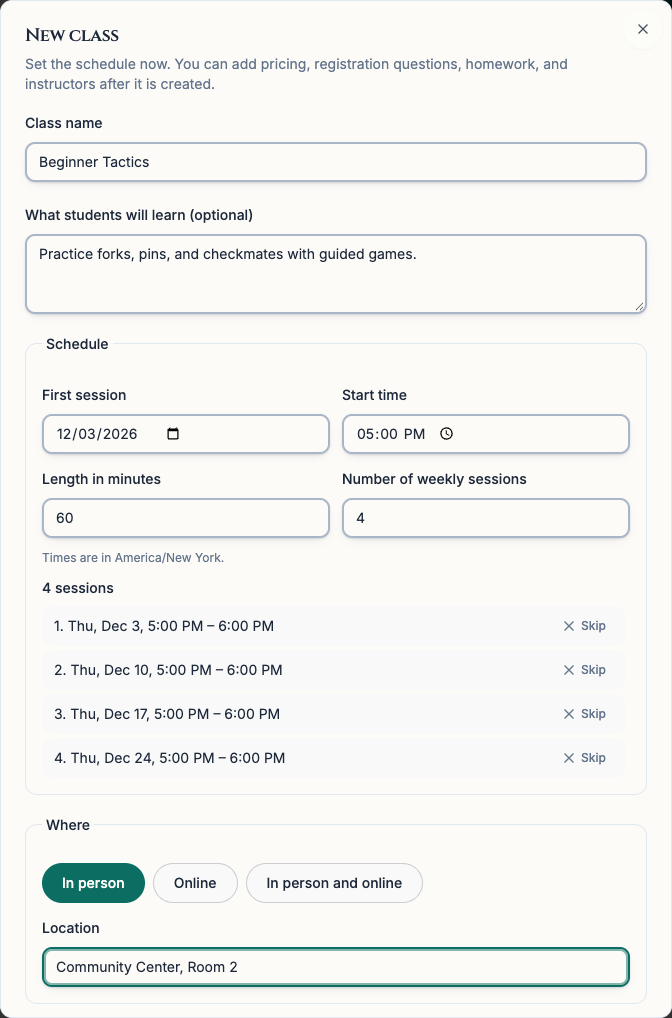
- Open the new class form. Give the class a name and describe what students will learn. Include the ages or skill levels it is meant for if that helps families choose.
- For a weekly class, enter the date under First session, then enter the Start time, Length in minutes, and Number of weekly sessions. Check the time zone and the dates shown below. Use Skip by a holiday or other date you cannot teach. Chess67 adds a week at the end to keep the same number of meetings.
- For a camp that meets on consecutive days, set Number of weekly sessions to 1 here and enter the first day's time. You can add the rest of the days after you save the draft.
- Choose In person, Online, or In person and online. Enter a location for in-person meetings. For online meetings, enter the link to your video call if you have it. Add a seat limit if space is limited.
- Leave Open for enrollment now off while you finish the dates, price, and registration questions. Choose Create class. The class opens on Settings.
- For a daily camp, choose Edit registration and dates → Details. Under Meeting dates, choose Add dates in a pattern and select day from the Every menu. Enter the number of additional days under How many. For a five-day camp, enter 4 and choose Add 4 more days. For days with different hours, choose Add another date and fill in each date and time yourself. Check the schedule and choose Update Event.
What it looks like
After you finish
The draft is ready for pricing, registration questions, and instructors. The class has one sign-up for its schedule, whether it meets once, every week, or over several days.
If you start in the event editor and type a title containing ‘class’ or ‘camp,’ you can choose the class suggestion to carry the title into the class form.